Blog Archives
One Week with Meta Raybans: Audio and Camera Insights

Original Purchase Date: October 3, 2024 (used for one week as of this writing)
One week of use is not enough to determine if these glasses live up to the hype, but I have racked up a solid list of what I like about them, and where they can also be frustrating. The glasses are great headphones, first and foremost. Wearing headphones that I don’t have to think about (like putting in airpods) means I listen to more music, more podcasts, and even more audiobooks. I find myself listening to Instagram Reels with the sound on now, where before I just watched in silence.
The camera is also proving to live up to my expectations. Taking pics and videos without touching my phone is a BIG DEAL. Keeping me in the moment, while still capturing a snapshot in time. I’ve also experimented with 1st person video for my cocktail club, the Runaway Anchor, and that works nicely. On the “half empty” side of things, the transition lens is not as dark as I had hoped, leading me to still switch to old fashioned shades when it’s really bright, and the AI assistant has been spotty (though I haven’t used it that much…yet). At the moment I am very happy with my purchase, but only time will tell if these truly become part of my day-to-day life, or if they end up just being another piece of tech I use from time to time. And if they only end up being headphones, I’m not sure that’s a total win.
I own several pairs of very nice headphones (including Airpod Max) and I can confidently say that these glasses are my new favorite headphones. If kept at 50% volume, people around you cannot hear what you are listening to, and when you crank up the volume full blast, you can enjoy music and podcasts while mowing the lawn (tested last weekend). The quality of the sound is certainly not on par with the big “over-ear headphones”, but that’s not the point with the Meta Raybans. The point here is all about access. How easy is it to just hop in and out of your audio content. I no longer have to put Airpods in and out all the time, or look for where I put my Airpod Max headphones. With the Meta Raybans, I am always wearing my headphones, while at the same time, I’m kind of never wearing my headphones. It’s trippy, and unlike much of the technology changes over the past 5 years, it’s kind of life altering. I interact with audio on a different level now. I sneak little snippets of music and podcasts all the time, where before I would have to dedicate time for listening to audio sources. I also listen to audio in Instagram Reels and News stories because accessing the audio is just a tap away, and I never did that before these glasses.
The audio is turned on and off with a single tap on the right side. Sorry all you left-handers out there, this is a right-handed device for now (sigh). Two taps will advance the track for music and three taps will go back a track. Touch and slide forward to increase volume. Touch and slide backwards to decrease the volume. That’s it. Whatever audio source you are using on your phone will be controlled by tapping. Switching between things like podcasts, audible and music is a little clunky at the moment. Spotify support is supposed to get better, and you can have a default service when you ask for music (mine is Apple Music). But you can’t ask for an audiobook on Audible to start right now. That’s also an update that is said to be coming in the near future.
There is also a touch and hold audio feature that will start a designated music source (amazon music, apple music, spotify or calm). I have that set for Spotify, as I have better playlists there (curated by my kiddo). It’s a bit random at the moment, and I use the feature for my “I don’t know what I want to listen to right now” moments. So that’s it for the headphones part.

The camera is what got me to pull the trigger on this purchase. The idea that I could grab pics when I’m doing something fun without the usual “phone fumble” was exciting to me. Think about it. If you see something cool and want a pic, you do this: take out phone, wake it up, open camera app, point camera at thing you want picture of, push the capture button, turn off phone, put phone back in pocket. That’s a lot of steps. And the moment you capture is through a viewfinder (as in your phone screen)! With the Meta Raybans your eye is the camera, and the capture is just a single tap (or a voice command of “Hey Meta take a photo” if your hands are occupied or perhaps in the pic). I even managed to snap a pic of a book I was holding, by pushing shutter and quickly putting the object into the frame (see pic).
The camera is easy to use. Tap the button to take a picture (again, on the right side only!!) Hold the button to take a video (default is 1 minute, but can be increased to 3 minutes in the mobile app). I discovered quickly that if you are wearing a baseball cap the camera will see it, and you get a notification that the “camera is blocked”, but only after you are done shooting the video. So I ended up turning my hat backwards when I use the camera, which isn’t a great look, but it is functional. I don’t do a lot of “out in the world” videos, but I’ve shot a few to show different light impacts on filming (I’ll share those videos in the future, when I deep dive into the cameras). For now, I’m much more interested in the “point and shoot camera” but again, the hat brim will get in the way…
The quality of the video and images is great. Not as good as most current mobile phones, but still great for their intended purpose (quick snaps of what you’re doing, without the need to grab your phone). The audio capture is also great. I’ve made a couple cocktail videos that worked nicely, and I did a recording while singing and playing the piano that turned out nicely too (I will not be sharing that video though!) Time will tell how much I continue to use the camera. It’s worth noting that you can set up the mobile app so when you import images and video from the glasses they will copy into your phone’s photo library too. And if you delete the images in the Meta Mobile app, it will ask if you’d like the library copy deleted too. That is very handy and keeps down the image clutter!




Alright, that’s enough good stuff. What about the bad stuff, right?!? Much like the new iPhones, the AI elements of the Meta Raybans are pretty basic, but promise updates “soon”. The command is “Hey Meta” and then you can ask basic questions. Weather and Timers work great (just don’t use the British voice assistant or you’ll get Celcius for weather). You can “google things” with some success. I was able to ask for the hours at a local restaurant before heading out the door (some day maybe I can get on the wait list with a quick voice command…) But, all in all, the AI is more of a gimmick, than a feature I use often. But I truly haven’t kicked the tires to hard yet, and plan to do that in the weeks ahead. Stay tuned.

The one AI element that has been most interesting to me is “tell me what I see”. When you ask this you will get a detailed description of what is in front of you. Down to pretty detailed elements. Then you can ask it to write a poem about what you see. Here the pic and poem the glasses came up with when I looked at my home desk. When the features update to include actionable questions, that’s when this tool goes from gimmick to useful. But we are not there quite yet. I am hopeful.
I’m just a little over a week with these Meta Raybans smart glasses, and so far I’m really impressed. A friend of mine, who is a fellow Meta Raybans owner, responded this way when I said I was really enjoying the glasses so far. “I know you’d love them… they are so in line with your tech values”. That is really true. I do not like my smartphone. I do not like staring at screens. I think it’s better when we put our tech aside and just be in the world. But realistically, we are stuck the mobile internet on our person at all times. So any tech that keeps my hands empty and data easily accessible is definitely “in line with my tech values”. And so far, these glasses are doing it. Now I just have to see if my usage is sustainable, and not just the excitement of something new. I’ll be back with more posts in the future, as I examine daily use and dig into specific features in much more depth. Till Next Time…

Where It Stands: Apple HomePod
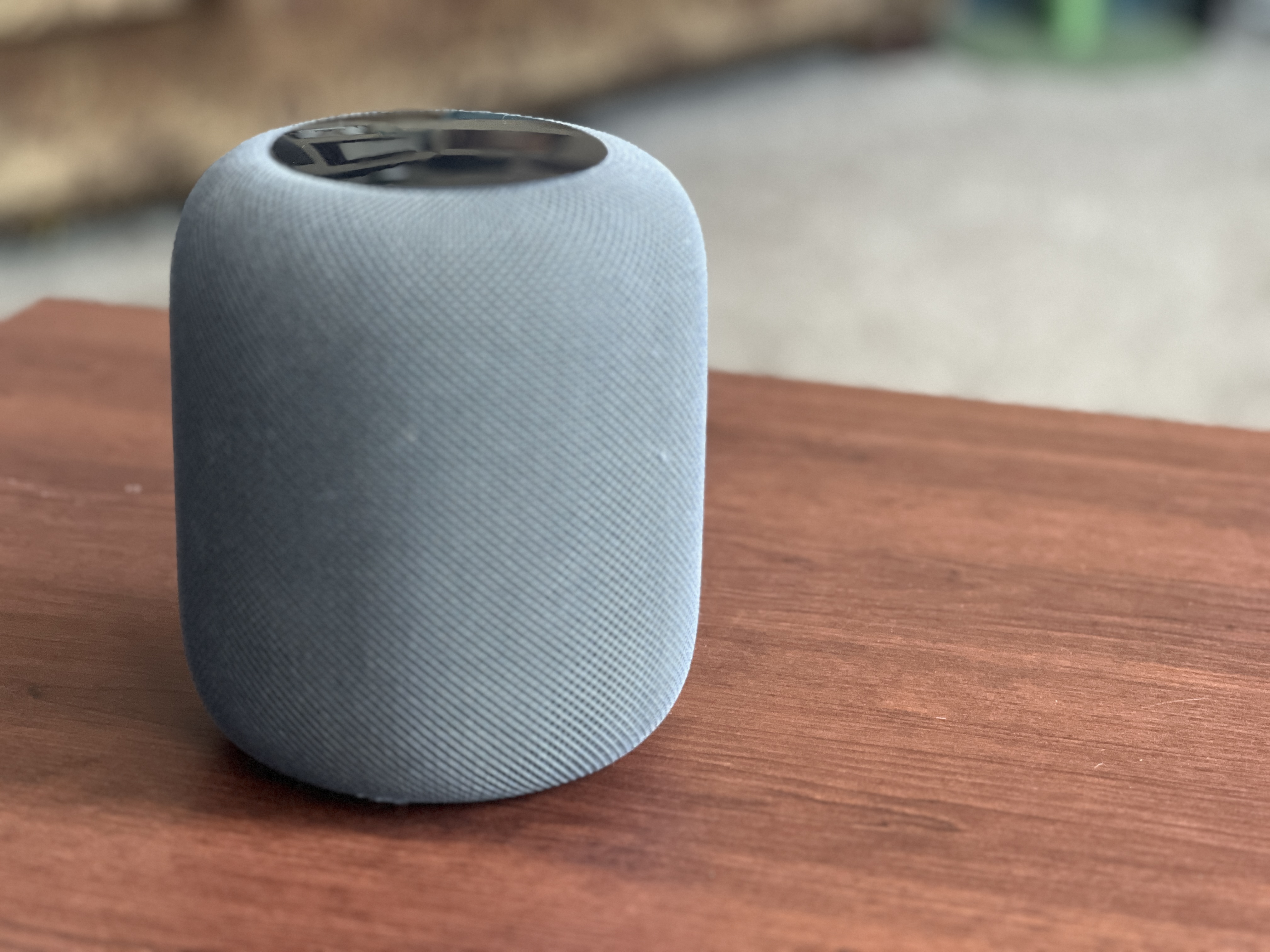
This is a review of the Original HomePod, released in 2018. That meant it was paired with the iPhone 6, to give you an idea of the time lapse here! The second generation was released in 2023, which means this first model had a 5 year life before the 2nd gen, which is pretty long for first generation technology. Let’s get into it.
Original Purchase Date: Spring 2018 (I did not review this product at time of purchase)
Time used between Purchase and Where it Stands: 6 years
I debated between the Sonos One and Apple HomePod at the time, and got to try them both. I went for Apple mostly because I thought it looked “cooler” and liked that it paired with my iPhone and Apple ecosystem. Sound-wise the two were the same to my non-audiophile ears. The speaker proved to be an amazing way to increase music playing in our house. Previously we’d been using a reciever and speakers with an iPod plugged into the Auxillary jack. With the HomePod, everything was just simple and the sound was amazing, and it stayed that way all these years.

A couple years ago we upgrade to a Samsung Frame TV. While the TV itself is pretty awesome (hidden on the wall of other framed pieces of art), the sound SUCKS! And the interface is almost un-usable. I do not recommend the Frame TV unless you plan to upgrade how you will use it with a Roku/FireTV/Apple TV setup. We choose, un-suprisingly, to pair an Apple TV, but that didn’t solve the sound issue, until I learned you could pair the HomePod as a soundbar! It worked almost seamlessly, and we have used the HomePod as our soundbar for the past couple of years. I imagine that two HomePods in stereo mode would be even better, but these things still cost $300, so we’re sticking with the one until it dies.
No review of an Apple product would be complete without mentioning Siri, the voice assistant. Most reviews are quick to call out the tool as “very bad”. Our house is ruled by a combo of Amazon Alexa and Apple Siri. We use Alexa to control our lights and other smarthome items. And we use Siri for music. Both assistants can set timers and tell you the weather just fine (though the Homepod couldn’t set timers when it first launched). They also both decide to start talking out of the blue for no reason. The Siri voice assistant is sure to get better when Apple rolls out “Apple Intelligence” in the next version of their Operating System in the fall of 2024, but for now, the voice assistant on the HomePod is fine. It’s functional. And rarely that annoying. As long as you don’t set your expectations too high.
We’ve seen no issue with sound quality over the 6 years that we’ve used the HomePod and recommend it to anyone looking for a high quality smart speaker. It’s best with Apple products, but it is also easy to use Spotify, which happens often with us, as we have a teenager in the house. Definitely a good product after all these years!
ElevatoR(eview) Verdict:
Design: Cup Half Full
Ease of Use: Cup Half Full
Sound Quality: Cup Half Full
Cost: Cup Half Empty
Overall: Cup Half Full
Long-form reviews of the current Apple HomePod to consider, when you have more time:
The Update I Was Waiting for… Music on the Echo Smart Speaker!!
 I first reviewed the Echo Smart Speaker in a “First Impressions” post on 12/11/14. So be sure to check that out here.
I’ve been kicking around writing a full review of the Echo Smart Speaker recently. The thing holding me back though was that I was pretty frustrated with a few specific elements of the speaker. I’m fine writing a bad review (check out my thoughts on the WinBook!), but the Echo had such great potential, and I knew it was one major update away from being something amazing. Well today that update came. Let me tell you briefly what it is.
It is a fully functioning bluetooth speaker…NOW
 When the Echo first arrived it could play music, but your choices were very limited. You were stuck with Amazon Music, I Heart Radio, and TuneIn Radio. If you didn’t have your music collection in Amazon’s cloud, you only had those streaming services as options. Amazon Prime Members can get access to Prime Music, but if you’re used to services like Spotify, RDIO, or Google Music, you’ll find Prime’s offerings pretty limited. And that was the kicker, and why I didn’t want to pass judgement on the device. Echo was a bluetooth speaker that didn’t act like a bluetooth speaker. It acted like a conduit to the Amazon ecosystem, which is very much the business model of the company (ask any Kindle Fire owner). This $100 device ($200 for non-Prime members) couldn’t attach to my phone via bluetooth to allow me to stream other music services, and that was a huge gap. But now that gap has been filled.
Just this week Amazon released on update that allows for bluetooth access. In their marketing they state that now “Spotify, Pandora, and iTunes Music” will work with Echo, but in truth any music service can now connect via bluetooth. That includes RDIO and Google Music, among many others. And now my Echo Smart Speaker is able to play my entire collection (personal music stored in iTunes, and music streaming via RDIO).
It is the smoothest setup I’ve ever seen
I was very frustrated when I first set up my Echo back in December. The need to create a new WIFI connection to link my phone, install the app, and then connect my home wireless was tedious and touchy. It took me a while to get things going. I think about casual users whenever I set up any device, and I worried that the setup was not the smooth experience Amazon is known for. But they fixed some bugs with the role-out of bluetooth connectivity. Here’s how it works:
 1. Say “Alexa, pair my device”
2. Alexa tells you to navigate to the bluetooth settings and select “Echo-###”
3. You follow those directions
4. Alexa says, “Your device is now paired”
That’s it. This worked on both my iPhone 6 and my iPad Mini (1st gen). Seamless. Once you start playing music on your mobile device, you can control it with your voice, just like the original music apps. Play, Pause, Next Song, Previous Song, Volume. It’s all controlled via voice. Though you can always control it with your mobile device too.
The Update That Was Needed
The Echo Smart Speaker is a great device. I already loved it before this update. Through Prime Music I found many playlists that have filled my house with music. I’ve used the “add to my grocery list” and “set a timer” functions many times. I ask for my “news update” now and then, and I think it’s amazing. I can see such great potential in this little speaker. And now with the full bluetooth functionality I’m not searching for music, or uploaded hundreds of CDs into Amazon’s cloud. I can use any music streamer I want from my phone or tablet, and the experience is great.
The jury is still out on whether or not it’s worth the full $200 that Amazon says it will cost when the Beta period is over, but we’ll deal with that when it comes. For now the Echo is truly living up to it’s potential.
Here are a couple other reviews worth checking out:
Amazon Echo Review: Listen Up –The Verge
Amazon Echo: A Promising but Not Fully Mature Voice — USA Today
Yes, you can stream any audio to Amazon Echo — CNET
 Have a Cup of T(ech)