Category Archives: Reviews
First Impressions – Echo Smart Speaker (from Amazon)
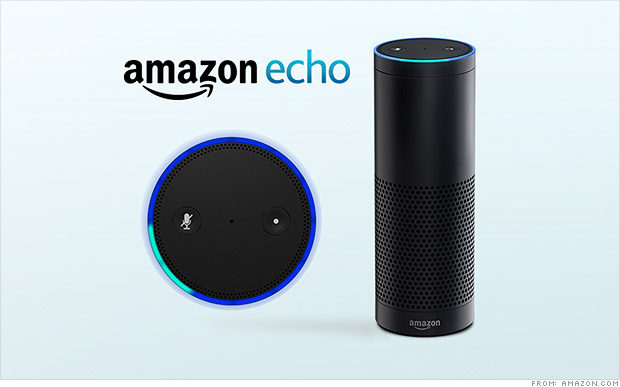
Amazon is usually not shy about releasing new products. Just opening up the home page of amazon.com will usually point you right at whatever new thing the company is pushing to the market. It’s the holiday season so the Kindle Fire tablets are front and center, which is not a surprise. But there’s a new device that Amazon is releasing very quietly. It’s a Bluetooth speaker called the Echo, and it’s like nothing you’ve seen before.
Thanks to a generous co-worker I am getting to test out this new device over the holiday season. Currently the speaker is only available via invitation (which you can request here). And it’s only for Amazon Prime members at the moment too, at the cost of $100 (it will be $200 when it releases to the general public). Based on my first couple of weeks with the Echo, I’ve already got my invitation request in! So what is the Echo exactly?
It’s a Bluetooth Speaker
There are tons of Bl uetooth speakers on the market; everything from the cheap things you can get at Wal-Mart or Target, to the higher end (while still consumer focused) devices like the Jambox from Jawbone. You can always drop a ton of coin on the offerings from Bose, but that’s not what the majority of casual music listeners are looking for in a Bluetooth speaker. The Bluetooth speaker I’ve had for a while is the Jam Wireless Speaker (which you can pick up for $30). It’s a decent speaker but it has to be charged, and has limited bluetooth range. So I’ve been pretty sour on Bluetooth speakers in general. But the Echo is a powered speaker (meaning it’s plugged into the wall all the time). So no issues with power drain. So far the Bluetooth range to my phone has been good too. No dropped connections at this point. But Echo is so much more than just a Bluetooth speaker.
It’s a Digital Assistant
Think Siri. Think Google Now. If you’re a Windows user, think Cortana. These are all digital assistants. They come in all high-end smartphones, standard these days, and in plenty of tablet computers as well. They are tools that connect you to the Internet, for news updates, weather reports, calendar appointments, Wikipedia searches, that sort of thing. I have an iPhone and rarely use Siri, but I do use Google Now quite a bit. Especially for those “what sushi bars are nearby” kind of questions. The Echo speaker has a digital assistant built into it, and her name is “Alexa”.
All you have to do is say the name “Alexa” and the speaker comes to life (via a spinning blue circle on the top) and begins listening for your questions. Simple things like “what time is it” and “ will it rain tomorrow” are child’s play for her. Using the WIFI element built into the speaker, Alexa can search Wikipedia with the best of them. Answering the question tech companies seems to always think we care the most about, you know it, “how tall is Mount Everest?” It’s really important that we all know this. And Alexa will make sure we stay informed. On that topic, you can ask “Alexa, give me my news update” and she will connect to either NPR or BBC radio to provide a quick news briefing just for you. There are some tailoring aspects that I haven’t had time to explore, but I’m excited to learn more!
With the Echo companion app installed on your smartphone or tablet, you can have Alexa save things to a “to do” list or a “shopping list”, just by saying “Alexa add milk to my shopping list”. That’s pretty handy. Now you don’t need to pick up a phone or tablet to have a digital assistant ready to take care of you. Alexa is still a bit of a beta device though, so she can’t answer everything, so be warned. “Alexa what movies are playing near me?” She hasn’t got a clue. But will gladly search BING for you.
One last note about music listening with the Echo. Prime members have access to “Prime Music” and that is the main resource Alexa uses when you ask for a genre or artist. Don’t be surprised that the selection is limited. Alexa can also search for any music you’ve purchased on amazon.com. The other two music resources, as of now, are “I Heart Radio” and “TuneIn Radio“. Both give you plenty of options for whatever genre of tunes you’re in the mood for.
It’s Always Listening
Here’s the coolest thing about the Echo speaker. There are microphones lining the top circle of the  device (where the pretty blue light shows up when active). And they are long-range mics, so even if you are across the room, the speaker can hear you and respond. “Alexa, play some Christmas music” and before you know it, chestnuts are roasting by that open fire! Do you want more volume, just say “Alexa volume up” or “Alexa volume 5”. Beware of going over Volume 7 though. I made the mistake of saying volume 10 to her (the highest setting) and the music was so loud the mics couldn’t hear me. Pretty funny scene though as I shouted for Alexa to turn the music down. Volume can be controlled via an included remote control too, but you won’t want to use it.
The Whole Cup Summed Up
 The Echo Smart speaker has a ton of potential. Tech writers are already speculating about what this new technology could mean for the future of home tech. Imagine coming home and saying “Alexa lights on and play some 80s hair bands” and it’s done (though darker lights might be a better choice if you’re planning to jam to Motley Crue). The possibilities go beyond lighting and sweet tunes though. Digital Assistants could control your thermostat (like the Nest does now), unlock your doors, open your garage, start your oven, or brew your morning coffee. We are only limited by our imagination! And Echo, along with Alexa is the first step into a pretty cool world.
To get an idea of what this device can do, check out Amazon’s official commercial here.
And for a slightly more “colorful” commercial, check out this parody.
Review – Pebble Smartwatch

For months I’ve been waiting for a device that I was certain would change the way I interacted with my smartphone, the Razer Nabu Smartband. But while waiting for it’s release I continued researching other smartwatches and smartbands. My fitbit flex died a couple months back and my first goal was finding a new fitness band that had (gasp) a clock! I had considered the Pebble at one point, but it had two things working against it. One, it had a price tag of $149 and two, it didn’t do continuous monitoring, which made it’s usefulness as a fitness band much less attractive. But then one day the news came to the tech blogs that changed everything. The price dropped to $99 for the original model, and the device now supported continuous monitoring, with only negligible impact on the 7 day battery life. My excuses gone, I plunked down the cash and picked up a Pebble Smartwatch. I’ve been using the device for over a month, so here are my thoughts.
The Cup Half Full
This device does everything I wanted it to do when I bought it. The pebble app has a ‘’store” offering a wide variety of watch faces, and using them I now have a few different faces telling me the time, date, and weather. I find it fun to switch between my standard watch faces to more fun ones like my Superman watch or my Dr. Who watch (12 doctors means each hour they show you a face but no hour – so you gotta know which Doctor it is!) So the “telling me the time” piece was handled.
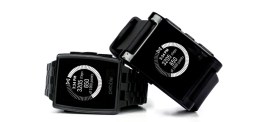 The app store also offers a fitness band app from the makers of Misfit (which has it’s own hardware if you’re interested in a fitness band). This app allows me to track my steps just like my old Fitbit Flex. It seems pretty accurate, so I’m happy with that piece.
The set up to receive notifications of text messages and emails was seamless, and very user-friendly. The watch will even alert me of incoming calls and I can reject them from my wrist if it’s not a convenient time to talk. I find these features to be very handy, as much as I expected it would be.
Beyond those three features that were requirements for purchase, I have found several other apps that I use regularly on the Pebble. One is a multi-timer, which I have set up to open with a hard press of one of the buttons on the right hand side of the watch. This give me access to a timers, stopwatches, and alarms all with one press. It works from everything from cooking to timing my child’s daily reading. Another app is the “music” app, which comes standard on the device (no store required). This app allows me to control the music playing on my phone from my wrist. This comes in handy when I’m using a bluetooth speaker at home and want to change tracks from across the room. It’s also handy when driving, as another way to leave my phone in the seat next to me, and decrease distracted driving opportunities.
Beyond these main apps, I haven’t found many other uses for the Pebble. I installed the Pebble version of Tetris (Pebtris) for a kick of nostalgia, but I found the controls very cumbersome (big surprise!).
 Two final things to point out, and they can’t be understated. First, unlike the majority of Smartwatches currently on the market (or coming soon), the Pebble is compatible with both Android and Apple products. This is very important. While Android has been pumping out some very cool devices lately, iPhone owners are out of luck. And no matter how much they want to use that new Apple Watch come January, Android users won’t have that option. The Pebble is truly one of the few smartwatch options that works on both. Android connected watches will have a few more options than their Apple counterparts (with their open system approach), but both systems will support all primary functionality, seamlessly.
And finally, the Pebble is waterproof. Meaning you can submerge this thing in water and you will have no issues. I have tested this (nervously), and it works great. If we are moving into an era of wrist computers, it is imperative that they be waterproof, because that’s a pretty big risk to be taking, just to wash your hands, with a computer strapped to your wrist!
The Cup Half Empty
For all the things a Pebble can do, it is still a limited device. It is an extension of your smartphone, and really nothing more. Aside from the clock (and a few select apps), the device requires a connection to your phone. I am hesitant to include this fact in my “half empty” section because I’m an advocate for our wristbands not being “wrist computers”. I am not a fan of having another device that pulls us into the internet and away from what is going on around us. So I should be happy that the Pebble’s functionality is limited (versus the higher functions found in Android Wear and the forthcoming Apple Watch). But as I’ve used this device for a while now, there is one thing I wish I could do that I cannot do, and that is respond to text messages.
I experimented with an app that allows you to create five preset text responses, to select individuals, but I’ve found that difficult to work with, to put it nicely. I think it’s great that I can see my texts on my wrist without pulling out my phone. But it would be an enhancement for me if I could make a quick response. Something as simple as “OK” or “On My Way”. But to do that I still have to pull out my phone, and I find that is often the case when I receive texts from people. Email notifications are great because they don’t call for immediate response, but texts are not always that way (rarely in my case). So to be able to speak a text response to the smartwatch would be great. You can do that on the Galaxy Gear, Moto 360, Apple Watch, and many others, but you can’t on the Pebble, and that is the one major piece that I only discovered was missing after I used the device for a while.
The Whole Cup Summed Up
T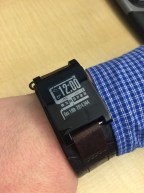 he Pebble isn’t trying to be what the other newer smartwatches are trying to be. It doesn’t have a mic or speaker. It’s doesn’t even have an LCD type screen (eInk is the approach with backlight). What this device does is keep you up to date on the things that are important throughout the day, and it keeps that smartphone in your pocket or purse. Want to know the time, date, and current temp outside? It’s got you covered. Text and email notifications on your wrist? Done. Add to that a few bells and whistles like music control, timers, pedometer, and games, and you’ve got yourself a pretty nifty little gadget for only $99. Try to find any Android competitor that is even close to that! But the Pebble is missing that mic and speaker and, like me, you might find that you miss that once you are using it. It’s not a deal breaker for me. I just pull out my phone and send my responses. No biggie. The positives far outweigh the negatives at this point. And the fact that the watch fits on any standard watchband meant I could transplant it to my favorite Fossil band!
While it’s not the fastest, or the most stylish, the Pebble is still relevant for the type of user who doesn’t want another phone strapped to their wrist. So give it consideration if you’re in the market. And if the standard Pebble seems a little to boring, with it’s plastic case, there is always the Pebble Steel, which is much more visibly appealing, while offering very similar functionality (and a higher price tag). This smartwatch has enhanced my life, and kept me focused on what’s important. Hopefully it could do the same for you.
Review Links – Apple Watch, iPhone 6, iPhone 6 Plus, and Apple Pay
By now you’ve probably heard all about the new products that Apple announced on Tuesday, and you want to learn more. The internet can be a daunting place when you go looking for good reviews of new consumer technology.
Below you will find links to some of the product reviews I’ve read for each new Apple product and service, so you can evaluate any future tech purchases you might be considering. Enjoy!
APPLE WATCH REVIEWS
Apple Watch Hands On – The Verge
Apple Watch Hands On – Engadget
Apple Watch Hands On – MacRumors

iPHONE 6 REVIEWS
iPHONE 6 PLUS REVIEWS
iPhone 6 Plus Hands On – The Verge
iPhone 6 Plus Hands On – Gizmodo
APPLE PAY REVIEWS
Apple Pay Hands On – TechRadar
Apple Pay (How It Works) – Digital Trends
Apple also announced the release dates for the iPhone/iPad operating system iOS8 on Wednesday, September 17th. It will be compatible with iPhone 4S, iPhone 5C, iPhone 5, iPhone 5S, iPhone 6, iPhone 6 Plus, iPad 2, iPad with Retina, iPad Air, iPad Mini, and iPad Mini with Retina. If you have an iPhone 4, you’re out of luck. There’s no cost for the upgrade.
iOS 8 REVIEWS (BETA VERSION)

The Device I Can’t Wait To Use – Razer Nabu Smartband
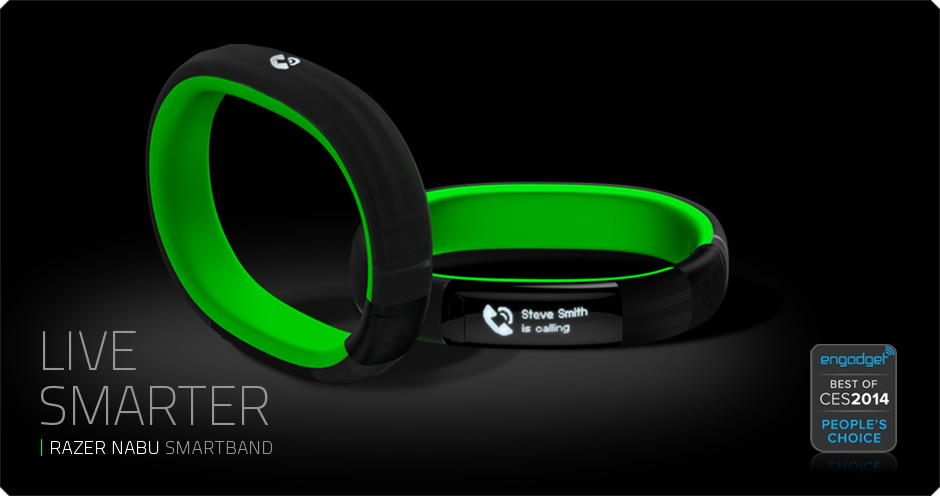
For the past month I’ve been introducing one device to everyone I know (and a few I don’t). And now I want to share it with you. Of all the upcoming devices this fall, this is by far the one I’m the most excited about. It’s called the Razer Nabu, and to say it’s a smartwatch would only give you part of the picture of why this device could be a bombshell in the current tech wars for our wrists. The Nabu has three areas of focus: notifications, fitness tracking, and a social element. While each of these areas has clear competitors, it’s when you put it all together that the smartband becomes something truly revolutionary. And the rumor that the device will sell for less than $100 is nothing but astounding.
It’s a Smartwatch
First and foremost the purpose of a smartwatch, in the current market, is to be an accessory for your smartphone. It’s a way to review incoming calls, read text messages, and perhaps even email. The Nabu does all of that. And their website hints at integration with even more tools like facebook, twitter, google maps, and skype. What make the Nabu different is how it notifies and how it is interacted with. Notifications come through via a small vibration. The screen is positioned on the inside of the wrist (they call it a privacy screen). You flip your wrist over to see the screen and that activates it (battery savings here!). Once you read the notification, you can press the button to dismiss, or simply shake your wrist and the screen goes blank. That’s pretty cool! You could almost say it’s a no-handed approach to notifications.
It’s a Fitness Tracker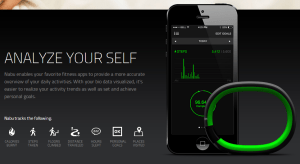
Simply put, everything a top of the line fitness tracker can do, the Nabu can too. It tracks steps, miles, floors, and calories burned. It’s a step above the Fitbit Flex wristband, being that it has an altimeter to measure flights of stairs. The expected price point for the Nabu puts in on the same level as the FitBit Flex, and cheaper than fitness trackers from Nike, Jawbone, and Garmin (among many many others). The fact that you are getting all the smartwatch features on top of your fully functional fitness tracker is like icing on the cake.
It’s a Social Connection Tool
Here is where the Razer Nabu gets completely ridiculous, and where my skepticism is introduced. I have no doubt that they can release a wristband with a unique notification system and a fully featured fitness tracker. What they plan to do with the social element of the Nabu is where they could truly be moving into uncharted territory. Since the device isn’t out, I can’t verify anything, but here, essentially, is what they plan to do.
Say you’re out at the bar and you meet someone and you want to exchange information to get in touch in the future. Old school days, you’d be writing a phone number on a napkin or your hand. Recent years, you’d be calling each other’s cell phones to add it to your phone book. In the world of the Nabu, if you both are wearing the wristband, all you have to do is shake hands or high five and the information is exchanged. If it works in the bar, imagine how it could work in the business world. Say goodbye to business cards, it’s all in your wrist! That could be revolutionary, if it works. And it could lead to storing more information in your wristband, like your credit card for purchasing with a swipe of the wrist. Who knows where this could go!
Razer Nabu Smartband – Coming Soon!
So that’s what I’m super excited about these days. The device was supp osed to roll out months ago, but it was held back to deal with questions about hypo-allergenic issues, which recently caused the recall of FitBit’s top wristband. So this company is taking it’s time to give us something awesome. Razer is well respected for it’s gaming peripherals (read keyboards and headsets) so they aren’t some Kickstarter with a dream (though sometime those work too).
The device is supposed to launch in October 2014 and will be compatible with Apple and Android from the very beginning! So check out their official website, and watch the cool video showing this thing in action. And if you’re still on the fence, you can wait for my review once I finally have this amazing little device on my wrist!
Below you’ll find some reviews from people who’ve actually used the Nabu Smartband.
Apps of Note – Hanx Writer (iPad app)

Sitting atop the free apps in the App Store is an odd choice. It’s a typewriter app. It’s actually the typewriter app that I am using to write this short review.
So, I guess Tom Hanks (yeah the ‘life is like a box of chocolates’ Tom Hanks) is really into typewriters. Seems to border on an obsession, but then again, I can think of worse things for a movie star to spend all his piles of money on. Mr. Hanks has decided to try and infect the rest of us with his typewriter hysteria, by way of the “Hanx Writer“.
The Cup Half Full
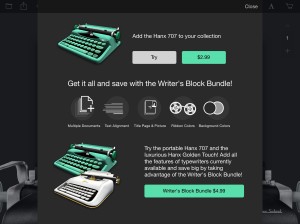
The app comes with one free typewriter interface, and it’s a decent design. You get an onscreen keyboard with buttons that actually move down as you press them. Of course half of the fun of typing on a typewriter simulator is the clicking sound of each letter and the PING of the carriage return. Fear not! There is no requirement that you physically move the carriage tray back to the left once you reach the end of the page (though you gotta admit that could be kind of cool). You get all the standard word processing options, including spell check, and the ability to backspace (no white out required). But for the courageous, you have the ability to turn off “modern delete” and type without the ability to correct. I am not that brave. While the free typewrite is decent, you do have the option to add additional typewriters for $2-$5. I’ve already made the upgrade to the “Writer Bundle” for $4.99 (see above).
The Cup Half Empty
There is a glaring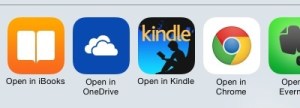 issue with this app, which has been well documented in the app store reviews, and it’s all about the export options. Basically you are typing a PDF document on this app. I say that because all of the export options (of which there are actually quite a few) only let you export in PDF format. You can’t export to Word or even to Pages. You can send it to Microsoft’s One Drive cloud storage, or Evernote, iBooks, or Kindle, but all you can do with the document there is READ it. I have found that you can copy and paste into any word processing app you might be using, so there is that. Though it’s certainly not ideal. I wouldn’t be surprised if the popularity of this app brings about some new exporting options in the future.
The Whole Cup Summed Up
The Hanx Writer is certainly a geeky indulgence. Are there better writing apps out there, with enhanced functionality? Of course there are. But the joy found in the sound of each button press is definitely something that will trigger the romantic side of many writers. The idea that we are getting a taste of an old way of crafting words and sentences into characters and story.
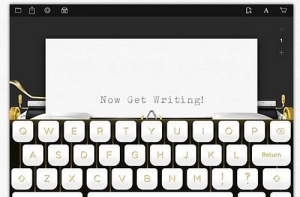
I’ve long held that the technology that captures our fascination and imagination the most are those that offer new ways of doing things with which we are familiar. And the Hanx Writer, typewriter simulator, is the essence of that idea turned right on its head! Doing something old on something new, in a revolutionary way!
So if you have an iPad or iPad Mini, and want to take a trip into composition’s past, grab this app and get typing!
Review – Everything Me (Smart Launcher for Android)

What is a Launcher? I hear this all the time. What do you mean you can change it? Why would I want to do that anyway? These are good questions. In a market dominated by the iPhone, most people don’t even realize they are using a Launcher. You are. It’s that grid of apps and folders on your iPhone screen. That’s your launcher. It’s how you interact with the device. And on an iPhone it can’t be changed. And that’s okay. It’s a good interface, and it’s certainly easy to use. So no worries all you iPhone users. I’m even an iPhone user from time to time, and I don’t mind the Launcher. It’s the same Launcher on my iPad Mini. So don’t get hot under the collar when I tell you that Android is different. With Android phones your Launcher can change, and it’s pretty cool when it does.
These are launcher screens. In order, they are HTC One (M8), iPhone 5S, and the Samsung Galaxy S5. All similar but different in their approach.


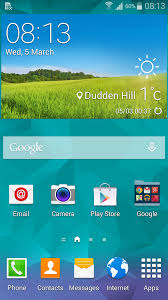
Every single Smartphone has a stock launcher. HTC has Sense. Motorola has BLUR. Samsung has TouchWIZ. When you first turn on your Android phone, you will be staring at one of those Launchers, masquerading as your phone’s “operating system”.
I currently use an HTC ONE (M8), and for the first couple months I used the stock Launcher, “Sense 6”. It’s a slick interface, but it looks a lot like every other launcher, including iPhone’s design. Both Apple and Android launchers have the ability to move apps around, and add folders. What makes Android different is you manipulate the screen in different ways. You can place apps in specific locations (not tied to the grid pattern), you can add widgets (that’s how Android phones have that big clock on the screen), you can even leave the screen blank (for the minimalist crowd). Android offers so many choices. Just open your Widget menu and feel your eyes glaze over at all the options. For the casual tech user there are simply too many, I would argue. So I set out to find a better Launcher.
My goal was simple. I was going to find Launchers that did everything for me. I don’t want to build my own folders. If it’s a game, put it in a folder called “games”. But I wanted to go even further. I wanted the device to figure out which apps I wanted and make them available. I wanted the phone to look different based on where I was and what I was doing. I didn’t want to have to do any work. What a quest! Impossible you’d think. But after testing out over ten launchers I settled on two. They are Everything Me and Aviate. While I’ve used both launchers consistently, for the sake of your time, I’m going to focus on my favorite, Everything Me. Perhaps Aviate will get its own moment in the spotlight down the road, as it’s a very close runner up. So let’s talk about “Everything Me”.
Everything Me
I’ve been using Everything Me for a couple of weeks now. This Launcher is what you’d call “smart”. That means it uses a variety of source data to customize your experience with your smartphone.  Replacing the stock launcher with this smart launcher is a simple process, and after you’ve entered a few pieces of information (location data for the most part) you are up and running. You’ll notice right away that the interface looks very similar but also very different. The grid of folders is still there, but it’s automatically grouped. There’s also a spot called “FIND”. And it’s there that Everything Me first shows why it’s such an amazing Launcher.
Amazing Search Function
The find button is truly what makes Everything Me unique. It gives you the option to either type or speak to search. When you search, the phone will bring back results both from your phone (installed apps, contacts, calendar, etc) AND from the Internet. That’s right, it basically does a google search for everything you are looking for.
The best demonstration I’ve found for this is a new album from my friend’s band “Put Down the Muffin“. I have the CD saved on my phone. When I search for “Put Down the Muffin” my phone brings back internal results, including a button to direct me right to the album within the Google Music app that I use to listen to my music on my device. But it also gives me Internet Links (by way of app icons) which send me to, say, the bands Facebook page! It’s remarkable, and combines several searches into one.
The Smartest of Smart Folders
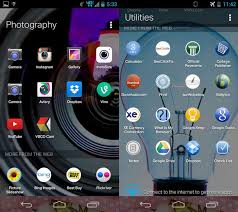
When I say the folders offered by Everything Me are smart, I mean really smart. The folders are generated automatically when you set up the Launcher. Games go in “games”, music apps go in “music”. Other smart folders on my device include, “news”, “shopping”, “health and fitness” and even “I’m Bored”. You can add and remove smart folders, you can move them around the screens, and you can customize them if you choose, though you probably won’t need to. But the creation of the folders is only the tip of the iceberg.
When you click on a smart folder everything changes. The wallpaper picture changes to something related to the category. The “social” folder shows a bunch of people’s faces in a huddle, the finance folder has a calculator, the photos folder has a camera lens, all serving as the background picture. The apps you have installed appear at the top (as the buttons you are used to), but just like the search function, the smart folder contains web search information for that category as well, appearing as additional apps. So when I click on “shopping” I see the apps I have installed “Google Play, Amazon, Target” but I also get links to web pages for other stores as well that I might consider. It’s a fast way to see more than you’re initially looking for, but perhaps exactly what you want to see!
The Whole Cup Summed Up
Everything Me is the best example I’ve found of a Smart Launcher. While so much is done for you, there is still the option to add your apps as icons, to add widgets, and personal wallpapers. The interface is still a grid of icons and folders, so the look isn’t too foreign to someone used to a stock launcher. But with Everything Me, I rarely go past the “Find” button, because if I want to do anything from make a phone call, listen to a song, search the web, or play a game, all I need to do is tell the phone what I want to do, and it takes care of the rest.
It is truly a SMART option, for us lazy people who don’t want to type stuff, or have a logical organization system for our many applications. So give it a try, because the best part is that this application is free and ready for you to experience.
Kindle Unlimited – The dawn of something new for digital readers??

One of the biggest stories this past week in the tech blogs was all about Amazon’s new offering, “Kindle Unlimited”. I have been a Kindle user since the Kindle 2 was released in 2009. And I’ve had a couple different models since then, including the Kindle Paperwhite, which is my current device.
Of all my gadgets and gizmos, I have always held the Kindle to be my favorite. I believe our personal tech should constantly amaze us. And while I use my smartphone and my iPad more often, it is the Kindle that causes that excitement again and again. There’s a hilarious bit Louis CK did on Conan about people flying on airplanes. Passengers were told that the plane now offered free high-speed Internet. When the service failed mid-flight, a fellow flier was immediately pissed. Louis CK’s response to his frustration was “We are FLYING PEOPLE!!! Isn’t this AMAZING?!? You are sitting in a chair IN THE SKY!!”
Our tech should cause us to feel that kind of wonder. And after years and years of reading physical books in dimly lit rooms, and struggling to keep track of notes for book groups, I now have a device that fits in my back pocket, holds thousands of books (a little overboard, I’ll admit), lights up, manages my notes, and provides dictionaries and Wikipedia links to help me keep track of more complicated story plots and characters. One click and I’ve downloaded a thousand page book right into my device. It’s a wonder. And after five years, it is still just as amazing as “sitting in a chair in the sky”!
Kindle Unlimited is supposed to be a big deal, a game changer, and I would look like the target audience. But I’ve been reading blogs like crazy and I’m ready to give my initial reaction. To keep with the site’s theme, I’ll break it down with “the cup half full” (good stuff), “the cup half empty” (bad stuff), and the “whole cup summed up” (summary).
The Cup Half Full
Who can argue with access to 600,000 books of all categories, and 150,000 audiobooks via whispersync? It’s important to bear in mind that while this gives you access to the “Audible” service, it’s only a 3 month trial for the 150,000 books, and afterwards you will be restricted to a smaller group of 2,000. It’s also important to note that in order to take advantage of the audiobook function, you’ll need a device with audio output. The Kindle Fire line will work (and any other tablet computer or smartphone), but the average Kindle, like my Paperwhite, does not support audio.
For $10 a month, the ravenous reading crowd will find great value. There are even a few big name books that almost anyone would find value in. Examples: All the Harry Potter books are present, Lord of the Rings Trilogy (if you can stay awake), and the Hunger Games books are there. It’s a great step in the same direction that Spotify and RDIO took music subscriptions services, and Netflix took film “rentals”. But it’s only a first step.
The Cup Half Empty
As a subscriber to amazon’s Prime service, I’ve had access to the “Kindle Lending Library” for quite some time. This service allows Prime members to access one Kindle book from a specific selection per month. What Kindle Unlimited does, in effect, is make the lending library available to everyone, for the first time allowing the service on non-kindle devices, like the iPad. I suppose that could be an item for the “good” list, but the problem is that the lending library has never provided a wealth of great reading options. This is clearly seen just by looking at the marketing of Kindle Unlimited on Amazon’s own website. The three main books you’ll see are the Harry Potter series, Hunger Games series, and Lord of the Rings.

Those are all great books (which became decent movies, wink), but don’t expect the soil beneath these best sellers to provide similar fruit. The lending library offers a great way into lesser known works across a wide genre range. But for the majority of readers that won’t be good enough. Amazon has been in many well publicized fights with a variety of book publishers, and those battles have resulted in Amazon launching Kindle Unlimited without a single major publisher on board. So if you want to read the New York Times best seller list, don’t expect this service to help you out.
That’s my biggest concern with Kindle Unlimited. While many are calling it the “Netflix of books” that’s only true if Netflix didn’t have any deals with major studios (which is far from the case). Amazon must find a way to either make peace with the publishing houses, or force them to finally change their business model (to favor amazon, interestingly enough). That’s no small task, and until amazon figures that out, this service will be constrained by its lack of titles.
The Whole Cup Summed Up
Are you a voracious reader? Do you chew through books the way some people fly through the new season of “Orange is the new Black” over on Netflix? If so, this service is perfect for you. Do you like to discover new things, and aren’t reliant on best seller lists to determine what book to crack open next? Then slam down that $10 and get started, it’s a no brainer. But for the rest of us, it might be best to hold off until the program grows a bit. Of course it’ll only grow if people show an interest in it. So there is a potential “investment opportunity” if you’re playing the long game.
I’m going to keep my 30 day trial going, and see what I find, how much I actually get read, and whether the cost is realized in actual value. I’m particularly interested in understanding how the Audible trial works. I’ll report back, at the end of the trial, as to whether I continue with the service, or if I just head back to my one book a month from the Prime lending library. For now, I’m skeptical, but still hopeful this is the beginning of a whole new way to be a reader in the digital age.
 Have a Cup of T(ech)